How to Reflow a Graphics Card: A Controversial Fix Explained
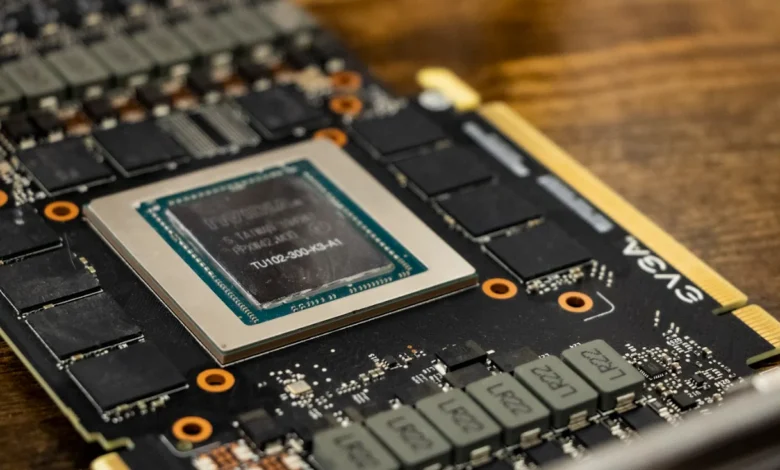
Reflowing a graphics card is a process that has sparked much debate. Essentially, it involves reheating the card to repair solder connections that may have failed due to wear and tear. Some people swear by this method as a temporary fix, while others warn it could lead to further damage or void warranties. In this guide, we’ll break down what reflowing is, how it’s done, and whether it’s a safe option for your graphics card.
What is Reflowing?
Reflowing a graphics card is a technique used to repair broken solder joints that connect various components on the card. These solder joints can weaken or break due to overheating, age, or manufacturing defects. The reflow process heats the card to a specific temperature, allowing the solder to melt and re-establish connections. While it might seem like a quick fix, it’s not a permanent solution, and many experts recommend seeking a professional computer repair service for serious issues.
Why Would You Need to Reflow a Graphics Card?
If your graphics card is showing signs of failure, such as visual artifacts, crashes, or not being recognized by your system, reflowing may seem like an attractive option. These issues often arise due to heat stress, which can cause the solder joints to crack. When other methods like updating drivers or adjusting settings fail, some people turn to reflowing as a last-ditch effort before replacing the card or seeking computer repair.
The Controversy: Is Reflowing Safe?
Reflowing is a controversial method because, while it might temporarily restore functionality, it doesn’t address the root cause of the problem. Many graphics cards fail due to heat-related damage, and simply reflowing the card doesn’t prevent future issues. Additionally, improper reflowing can permanently damage the card, leading to a costly computer repair. Professional computer repair services are generally recommended for major repairs, but DIY enthusiasts may attempt this method if they’re prepared for potential risks.
Symptoms That Might Indicate a Need for Reflow
1. Visual Artifacts and Glitches
If your screen displays unusual shapes, lines, or color distortions during use, this is a sign that your graphics card might be malfunctioning. These symptoms can point to loose or broken solder joints, which could be temporarily fixed by reflowing or addressed more reliably through a computer repair service.
2. System Crashes or Freezes
Frequent system crashes, especially during graphic-heavy tasks, may indicate that the graphics card is failing. Reflowing might provide a temporary fix, but if the crashes persist, it’s probably best to consult a computer repair expert.
3. Graphics Card Not Recognized
If your system doesn’t recognize your graphics card at all, it could be due to a failure in the card’s solder joints. Before trying the reflow method, ensure that other potential issues like faulty drivers or connections are ruled out. If reflowing the card works, it’s likely the problem was related to the solder joints, but this is usually a short-term fix before considering a proper computer repair service.
How to Reflow a Graphics Card: A Step-by-Step Guide
If you’re considering reflowing your graphics card, here’s a basic outline of the process. Keep in mind that this procedure carries risks, and it’s always better to consult a professional computer repair service when in doubt.
Step 1: Prepare the Necessary Tools
You’ll need the following items for reflowing:
- A heat gun
- Aluminum foil
- A non-conductive surface
- Thermal paste
Step 2: Disassemble the Graphics Card
Carefully remove the graphics card from your system. Disassemble it to expose the GPU and main circuit board. Make sure to clean the surface and remove any old thermal paste.
Step 3: Wrap Non-Essential Parts in Aluminum Foil
Wrap the areas of the card that you don’t want to be heated (such as the plastic components and connectors) with aluminum foil. This prevents unnecessary heat damage.
Step 4: Apply Heat
Using the heat gun, carefully heat the GPU area in a circular motion. Aim for a temperature between 200°C to 230°C (400°F to 450°F) for about 8 to 10 minutes. Be cautious not to overheat as this could damage the card permanently, leading to the need for professional computer repair.
Step 5: Let the Card Cool
After heating, allow the graphics card to cool for at least 30 minutes. This gives the solder time to solidify and re-establish connections.
Step 6: Reassemble the Card and Test
Once the card is cool, reapply thermal paste to the GPU, reassemble the card, and test it in your system. If the problem was related to broken solder joints, the card should function again, though this is typically a temporary fix.
When Should You Seek Professional Help?
While reflowing might provide a quick fix, it’s not always the best solution. If your graphics card continues to show issues after reflowing, or if you’re not comfortable performing the process yourself, it’s wise to seek a computer repair service. Professionals have the tools and expertise to handle more complex repairs and can ensure that your card is fixed properly without risking further damage.
Alternatives to Reflowing
1. Reballing
Reballing is a more permanent solution to the same problem that reflowing addresses. It involves completely replacing the solder balls under the GPU, which can restore the card to a much more reliable state. However, this requires specialized equipment and is best handled by a professional computer repair service.
2. Replacing the Graphics Card
If your graphics card is beyond saving, replacing it might be the best option. While reflowing might temporarily revive a failing card, it’s only a matter of time before the problem reoccurs. Investing in a new graphics card is a more permanent solution and can save you from repeated repairs in the future.
Conclusion: Is Reflowing Worth It?
Reflowing your graphics card can be a quick and cost-effective solution, but it’s not without risks. While some people have success with this method, others find that it only temporarily fixes the issue. In many cases, it’s worth considering professional computer repair services or even replacing the card altogether. Ultimately, if you’re comfortable with the risks, reflowing can be a last-ditch effort before more extensive repairs are needed.


